Sentinel

Stop refreshing. Sentinel will tell you.

Sentinel watches the product pages you care about, across the stores you shop, and messages you the moment something is back in stock.

Public beta Free for up to 10 products. macOS (Apple silicon) and Windows.

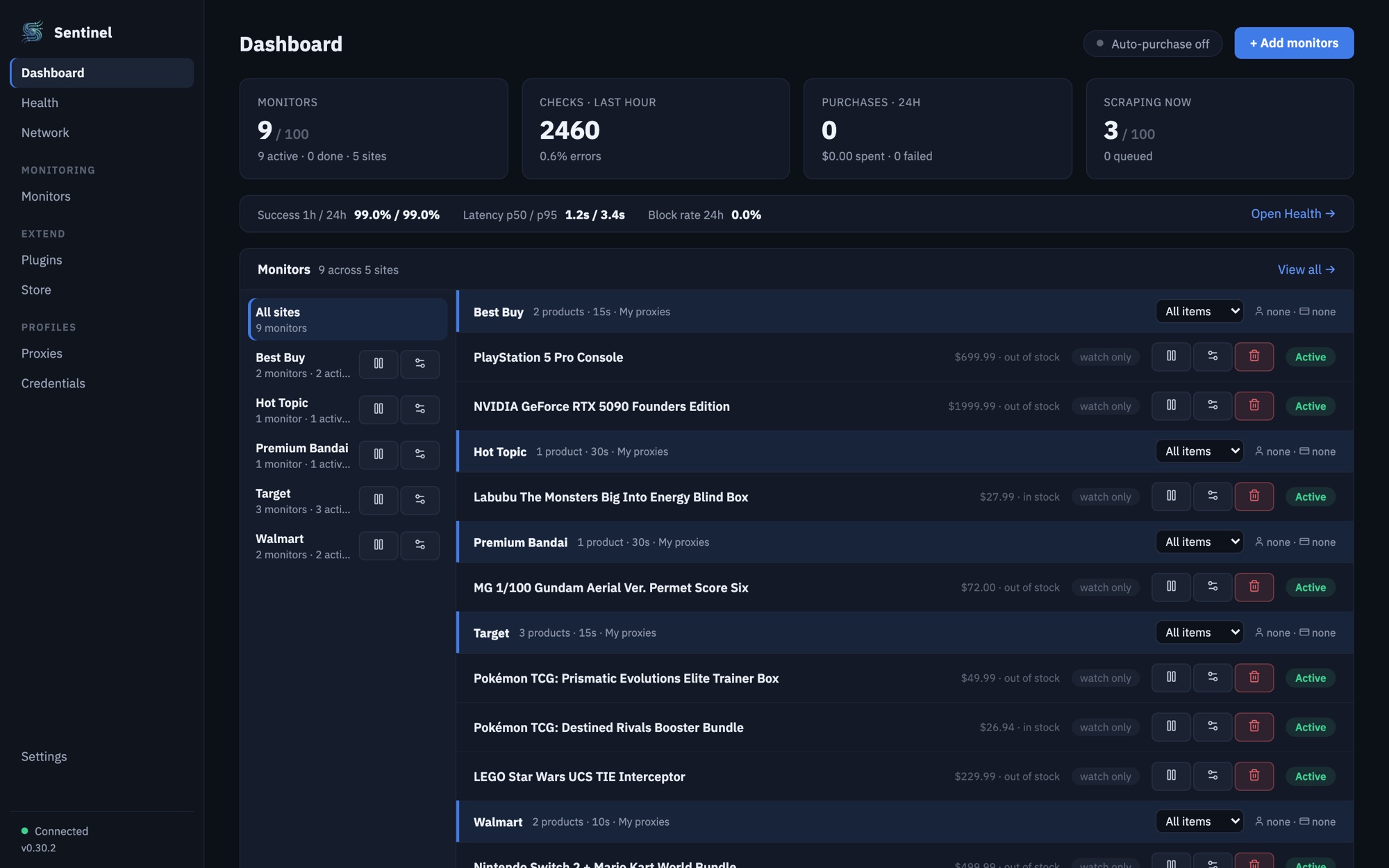
The Sentinel dashboard watching nine products across Best Buy, Hot Topic, Premium Bandai, Target and Walmart, with prices and stock for each.
  • Sentinel desktop notification now
    Back in stock: Pokémon TCG: Destined Rivals Booster Bundle Target · $26.94
  • Sentinel Discord DM now
    In stock Pokémon TCG: Destined Rivals Booster Bundle Target · $26.94
  • #restock-alerts in your server now
    In stock Pokémon TCG: Destined Rivals Booster Bundle Target · $26.94

You shouldn’t have to watch the page all day

You find the thing you want, and it’s sold out. So you bookmark it, check at lunch, and check again before bed.

  1. You check one last time. Still sold out.
  2. It restocks while you’re asleep.
  3. It’s gone again.
  4. You find out from someone else’s post.

Sentinel does the checking for you. Give it the pages you care about, on any store it supports, and it watches every one from your own computer. When something comes back, your phone buzzes at 3:12, not 8:05.
Set it up in a few minutes

No scripts or browser extensions. Paste links, choose how often to check, pick where alerts go.

  1. Step 1

    Paste the products you want

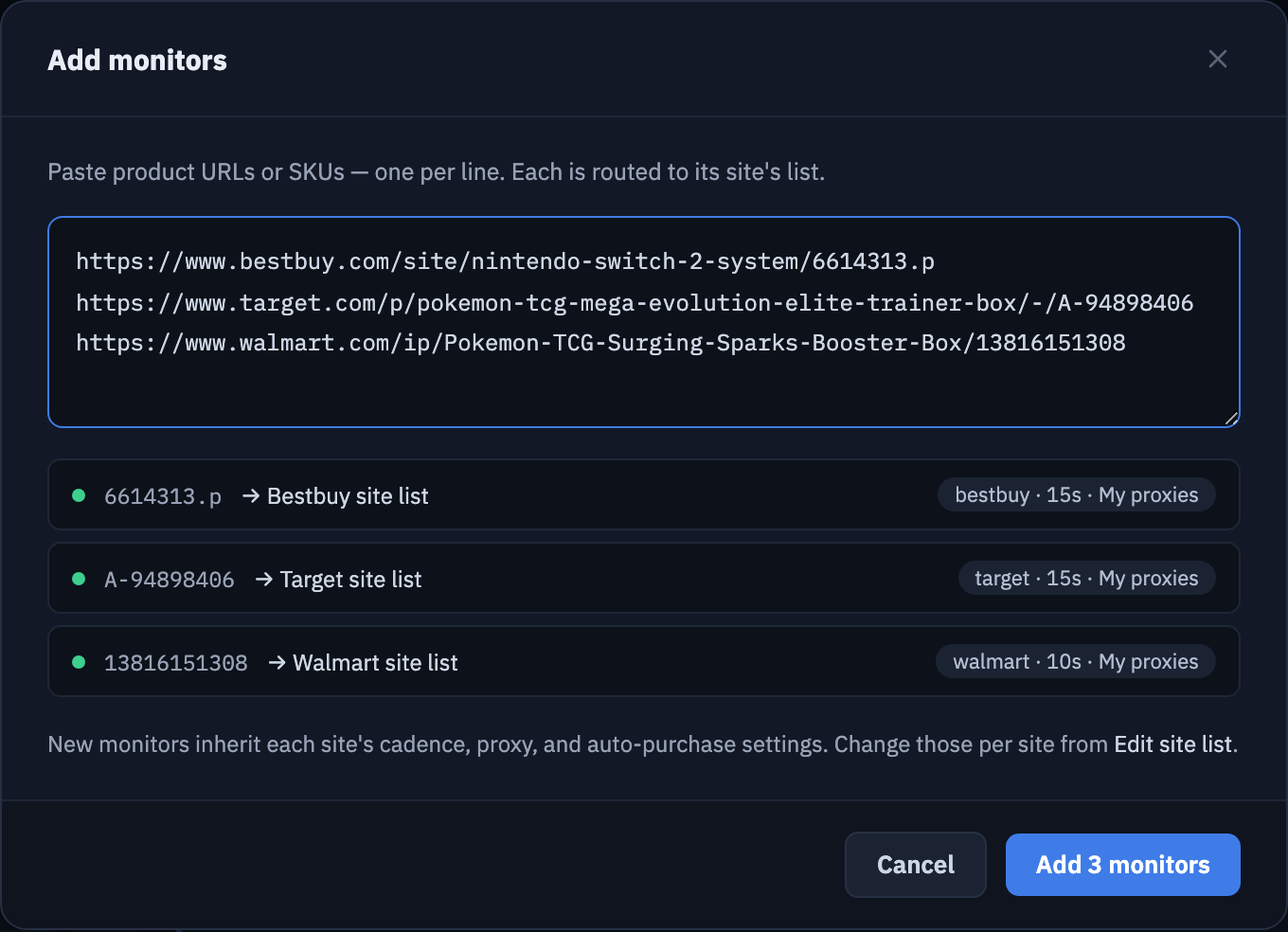
    Copy product links or item numbers from any supported store and paste them in, one per line. Sentinel sorts each one to its store and starts watching.

    The Add monitors dialog with three pasted links from Best Buy, Target and Walmart, each matched to its store, and an Add 3 monitors button.
  2. Step 2

    Choose how often to check

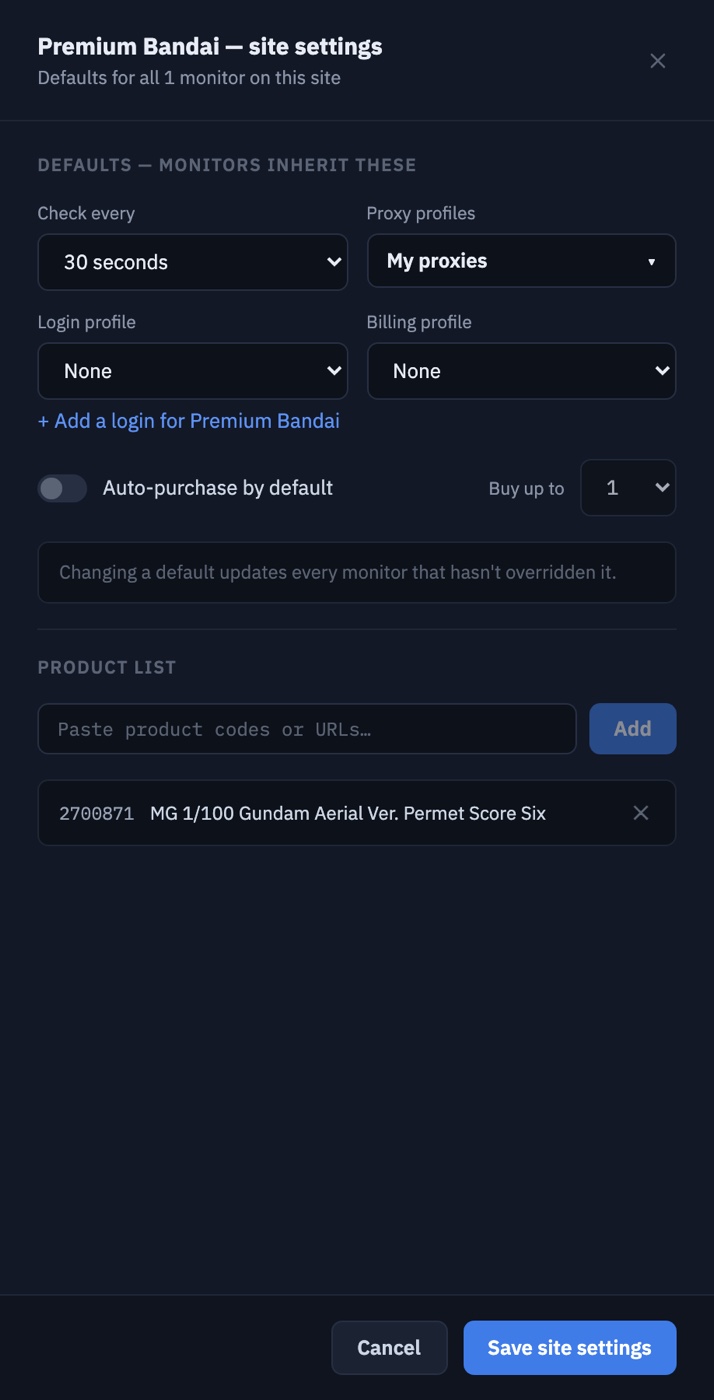
    Each store has its own settings. Set how often Sentinel checks and which proxies it uses, and every product on that store follows along unless you change it.

    Site settings for Premium Bandai with Check every set to 30 seconds, a proxy profile selected, and the store's product list.
  3. Step 3

    Pick where alerts go

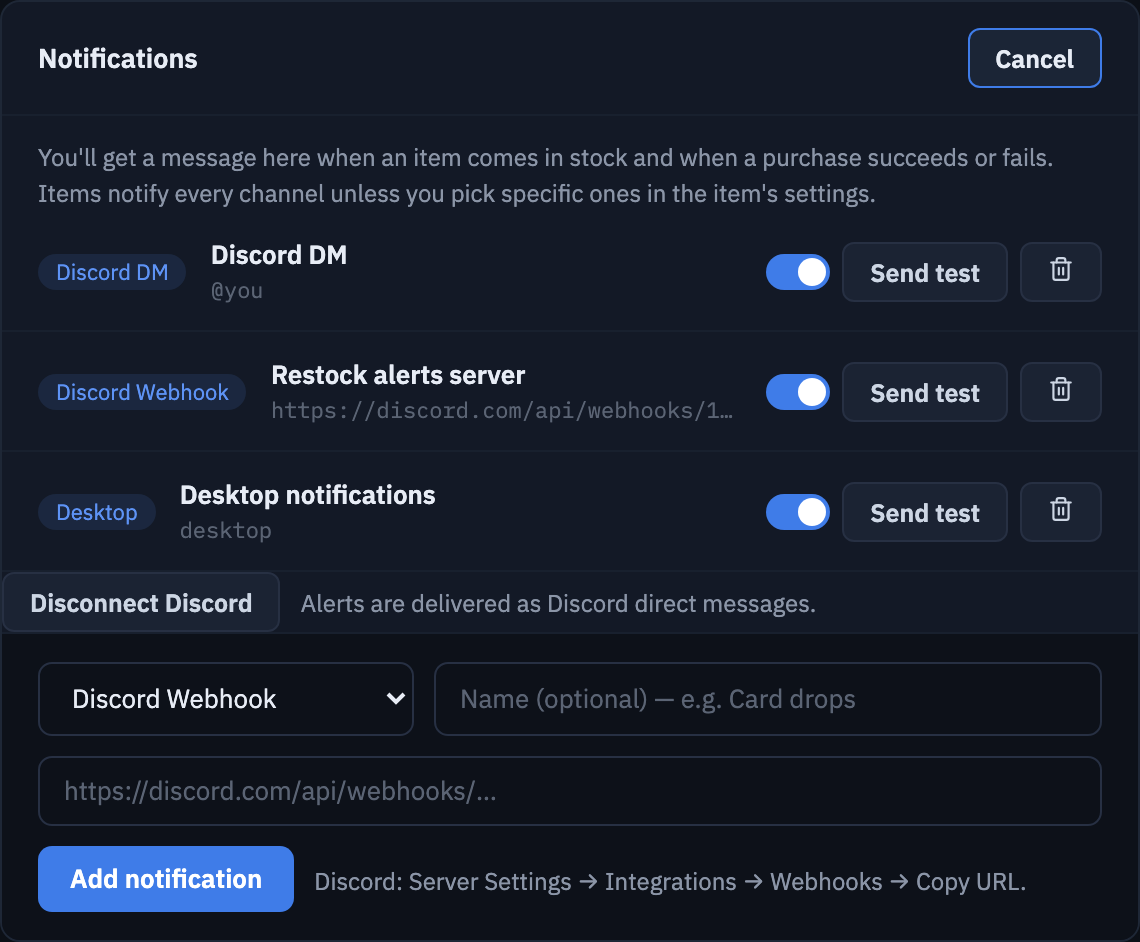
    Use any mix of these. Every alert names the product, the store and the price, with a link straight to the page. Send a test to each one before you rely on it.

    Discord direct message
    Connect your Discord account once and Sentinel messages you directly, so it reaches your phone.
    Discord server webhook
    Post to a channel in your own server, so friends can watch the same drops together.
    Desktop notification
    A notification on the computer Sentinel runs on. Click it to open the product.

    See the full guide

    Sentinel's Notifications settings with a Discord DM, a Discord webhook and desktop notifications set up, and the form for adding another Discord webhook.

Bring your own proxies

Stores notice when one address loads the same page every few seconds. Proxies keep your checks from getting you slowed down or blocked.

Why they matter

Every check is a page visit. Watch a few products every 30 seconds and that adds up to hundreds of visits an hour from your home connection. Stores answer that with slowdowns, captchas, or a block on your address. Proxies spread those visits across many addresses, so checks keep working and your own connection stays clean.

You supply them

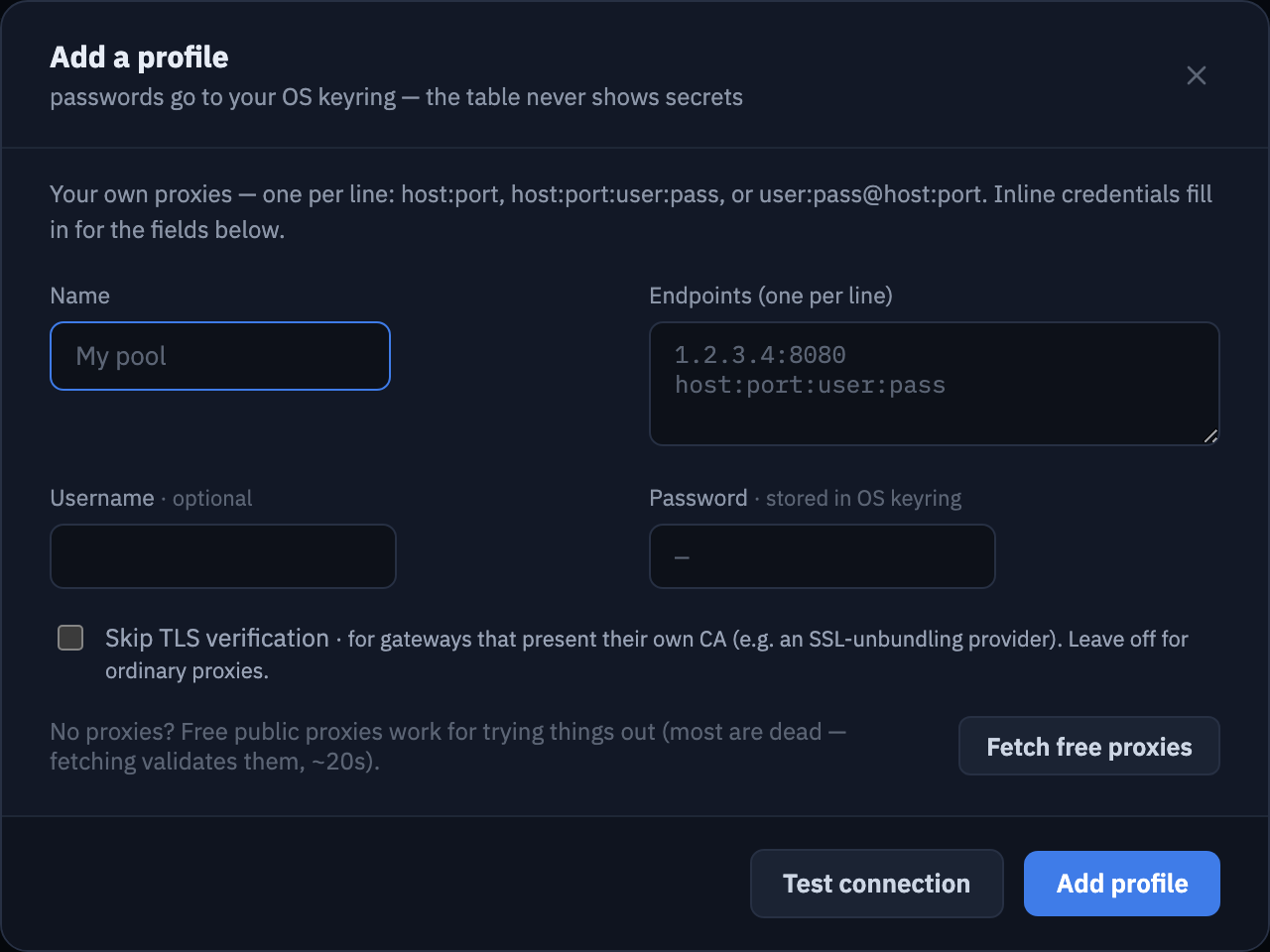
Sentinel doesn’t sell proxies or route anything through us. Buy them from any provider you like and paste them in as host:port, host:port:user:pass or user:pass@host:port. Passwords go into your computer’s keychain.

You decide where they’re used

Group proxies into profiles and pick one per store. Sentinel spreads checks across the addresses in it, and tests each profile before you rely on it. Watching only a few products? You can start without any.

Adding a proxy profile: a name, a list of endpoints one per line, a username, and a password field marked stored in OS keyring, with Test connection and Add profile buttons.
Proxies, Add a profile. Test the connection before you save it.

Works with the stores where drops happen

  • Walmart
  • Target
  • Best Buy
  • Amazon
  • Premium Bandai
  • Hot Topic
  • Crunchyroll
  • Shopify stores
  • OpenTable
  • more on the way

Each store is a plugin you install from Sentinel’s built-in Store, and new stores arrive without reinstalling the app. Sentinel isn’t affiliated with any of these stores.

Coming later

Automatic checkout, built to be careful

When purchasing arrives, Sentinel will be able to buy an item with your own account the moment it’s back, on stores that support it. Here’s how it protects you.

It never buys through a proxy

Proxies are for watching. Checkout goes out over your own internet connection, the same one the store already knows from your normal shopping, so your order doesn’t look like it came from a stranger.

Your credentials stay in your computer’s keychain

Store logins and card details are kept in macOS Keychain or Windows Credential Manager, not in Sentinel’s files. They never reach our servers and are left out of every backup and export.

Off until you turn it on

Nothing is ever bought until you switch checkout on for a store and accept the terms for placing real orders.

Test mode and price limits

New stores start in test mode, which stops before the order is placed. Set a maximum price or order total and Sentinel refuses anything above it.

Get Sentinel Beta

Always the latest version. Sentinel is in public beta, so expect frequent updates. The app installs them itself. New to it? Start with the guide.

  • 10 products watched at once
  • 30s between checks
  • 3 ways to get alerts
  • Your own proxies